
My advice: test a correction and an export before paying for a time tracking app. I would not choose based on price alone: you need to record working time, track changes, and retain the data for 4 years.
I compare 10 options by their clocking methods, reports, employee access, integrations, and cost. For field teams, I would review itcons.app and its work reports; to combine clocking and HR, I would compare the suites. If you want to start without paying, itcons.app, Bixpe, and Jibble offer free plans, but with different limits.
Quick comparison
These are the prices listed in the article, subject to confirmation depending on the plan and contract terms.
| App | What I would check first | Starting price |
|---|---|---|
| itcons.app | Working time, work reports, and work orders | Free; paid plans from €4.59/user/month with annual payment |
| Factorial | Clocking and personnel management | Quote on request |
| Sesame HR | Clocking via web, mobile, tablet, and WhatsApp | From €4.75/employee/month; check minimums |
| Bizneo HR | Time tracking, absences, and shifts | From €399/year for 5 employees |
| Kenjo | Clocking, shifts, and absences | From €6/employee/month |
| Bixpe | Simple clocking and available history | Free; Premium at €2/user/month |
| Woffu | Clocking methods by location or team | Lite from €1.50/user/month, up to 10 employees |
| Personio | Working time and personnel processes | Quote on request |
| Sage HR | Core HR with added time tracking | From €4/employee/month |
| Jibble | Mobile clocking and shared terminals | Free; confirm paid plan rates |
<u>Before signing up</u>, I would ask for the total cost excluding VAT, viewing permissions, and the terms for retrieving historical data after cancellation. A free app may work for you, but not if its limits prevent you from saving or downloading the records you need.
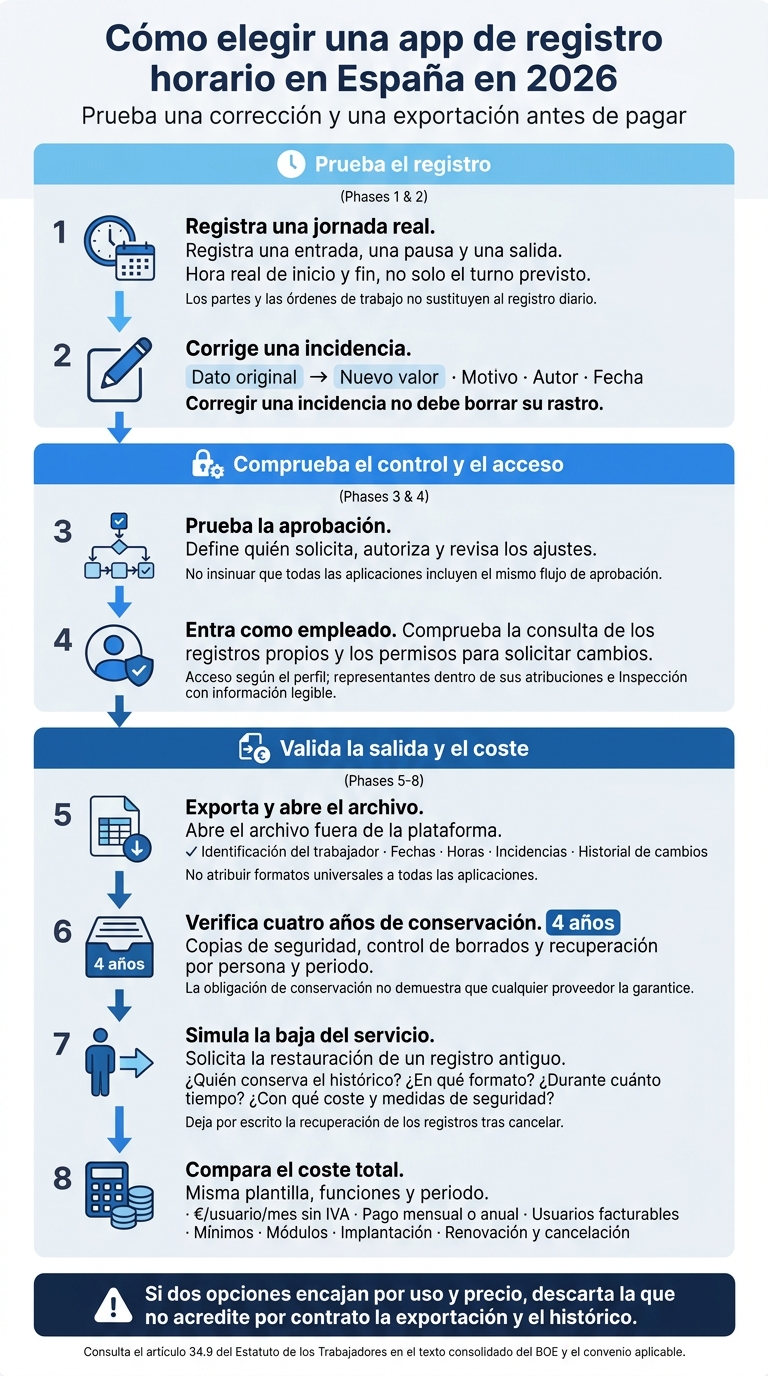
How to choose a time tracking app in Spain in 2026
Spanish regulations: daily records, access, and retention for four years
Before comparing features and prices, be clear about what the law requires and what the system must demonstrate. Article 34.9 of the Workers’ Statute requires recording the actual start and end times of the working day, not just the scheduled shift, and taking agreed flexible working arrangements into account. How records are organized is agreed through collective bargaining or a company agreement. If there is no agreement, the company decides after consulting employee representatives.[9][10]
Always consult the consolidated text in the BOE. Do not confuse current obligations with proposals, draft bills, or reforms that have not yet entered into force.[12][13]
The law does not require a specific app: using Excel or paper is not inherently illegal. What matters is that the system is reliable, records working time every day, and allows changes to be audited.[14][15] Also review the rules of the applicable collective agreement.
Records must be retained for four years. This requires backups, deletion controls, and the ability to retrieve data by person and period, even after canceling the service.[9][11] This does not mean granting unrestricted access to the entire database: each employee must be able to view their records; their representatives must have access within their remit; and the Labor Inspectorate must be able to obtain readable information. Check that exports include dates, times, and employee identification.
Corrections require a documented procedure that retains the original data, the new value, the reason, the author, and the date of the change. Correcting an issue must not erase its trail. Define who requests, authorizes, and reviews adjustments, as well as how breaks and remote work are recorded. This history will help you assess each app’s actual quality.
For privacy matters, consult the guidance from the AEPD. Geolocation must be necessary, proportionate, and disclosed: clocking with location data does not justify continuous tracking. Fingerprint and facial recognition require an appropriate legal basis, a rigorous assessment, and consideration of less intrusive alternatives before activation.
sbb-itb-b01fb3c
1. itcons.app
Clocking from mobile and web
itcons.app allows employees to clock in and out from Android, iOS, and a browser. The administrative team has centralized access to records. Its working time tracking suits maintenance, installation, and service companies with field staff. Before implementing it, use an employee account to test which records they can view and which permissions they need to correct them.[1]
The idea is to combine time tracking and work management without duplicating records.
Work reports and work orders
Work orders are used to assign services, while digital work reports record hours and evidence. However, daily clocking must remain separate from work reports and work orders.[1][16]
Pricing and limits per user
Rates are per user per month, excluding VAT. Check their validity and contract terms under plans and pricing.[2]
| Plan | Monthly billing | Monthly equivalent with annual billing | Work reports and documents |
|---|---|---|---|
| Basic | €0 | €0 | 20 per month |
| Advanced | €4.99 | €4.59 | 40 per month |
| Pro | €9.99 | €9.19 | Unlimited |
You can combine plans within the same company. If no Advanced or Pro plan is active, an overall limit of 300 accumulated documents applies. This limit does not affect working time records, which are unlimited across all three plans.[2]
Review how plans are assigned based on each user’s activity and how they affect the bill.[2] If you generate many work reports or documents each month, keep that accumulated limit in mind.
Reports, access, and retention
According to the product information, Basic and Advanced calculate reports based on an 8-hour working day. Pro allows you to adjust the expected regular hours for each day.[2]
All three plans include PDF and Excel exports.[2] Also check the change history, access by role, and the ability to retrieve records for four years, even after canceling the service.[1][3]
2. Factorial
Factorial suits SMEs looking to combine clocking, shifts, and HR management in a single suite.
Clocking
Factorial supports clocking via the web and mobile app. Corrections are logged, and geolocated time entries retain the original location.[20][22]
Reports
You can export approved timesheets as PDFs and other reports in Excel or CSV.[18][19]
Record retention
Confirm in the contract that records are retained for four years and remain accessible after termination. Exporting the entire account requires an authorized request. That export does not replace the time tracking report.[18][19][21]
Employee access
You can restrict access by role and block editing of shifts and breaks.[20][22]
Pricing and plan limits
Pricing on request. Ask for a breakdown covering time tracking, shifts, geolocation, payroll, API, implementation, and support.
Payroll integration and API access depend on the modules purchased. Check the connector’s cost, whether it supports Spain, and which data your payroll adviser receives.[17][23][24]
Also confirm the minimum number of users, VAT, minimum commitment, renewal, notice period, and the deadline for retrieving data after termination. Do not assume the price includes every module in the suite.
Before signing up, test exports, permissions, and data retrieval with a real account.
For teams looking for multiple clocking channels and HR modules, Sesame HR is another option.
3. Sesame HR
Clocking and employee access
Sesame HR supports clocking via web, mobile, tablet, and WhatsApp.[27][30] The last channel may be useful for field staff or employees without a fixed workstation.[6]
Before signing up, check which methods the plan includes, whether each employee can view their records, and whether corrections are logged.[27][28][29]
Reports and retention
Reports cover scheduled hours, hours worked, overtime, and additional hours for part-time employees. You can filter and export them in Excel, PDF, and CSV.[25][31]
Sesame states that it retains data for four years,[25][27] but does not clarify what happens when the service is canceled. Ask about the download deadline, possible costs, and whether exports include the change history.
Integrations and HR processes
Besides recording working time, review how it connects with payroll and other processes. The platform organizes working time, shifts, and absences into modules. Integration with a3innuva is listed under Core, while the API/MCP costs from €0.50/employee/month.[5][29]
Confirm what each connection allows, which data is transferred to payroll, and which data you must review manually. Integration reduces duplicate data entry but does not replace review.
Pricing and plan limits
The pricing information provided lists these amounts excluding VAT:[5]
| Plan | Price per employee/month | Advertised monthly minimum |
|---|---|---|
| Essential | €4.75 | €71.25 |
| Connect | €5.50 | €82.50 |
| Growth | €6.25 | €93.75 |
| Scale | €8.00 | €120.00 |
The website displays another table with different amounts depending on the package. Ask for a firm quote detailing the minimum billable amount, implementation, included modules, and exactly what time tracking, integrations, and support cover.[5][26]
4. Bizneo HR
Clocking and employee access
Bizneo HR supports clocking via the web and mobile.[32] Under “Time > My time entries,” each employee can view their scheduled hours, recorded hours, and accumulated balance, as well as export data to Excel.[38]
Before signing up, check what the plan includes: scheduled clocking, bulk weekly entries, QR codes, geolocation, and offline clocking.[32][37]
Reports and retention
Reports include issues, overtime, time banks, night work, and shift work. Test a monthly export and check that it retains the time entry, correction, author, date, and reason.[35][36]
Ask for written confirmation that records are retained for four years and can be accessed by employees, their representatives, and the Labor Inspectorate.[33]
Integrations and HR processes
Besides clocking, review how Bizneo HR connects with payroll and shifts. You can purchase the time tracking module separately or combine it with vacation and shift management.[32]
Confirm which payroll, absence, and shift connections your plan includes, which require configuration, and which are excluded.[34]
Pricing and plan limits
The published prices correspond to different offers, not a single time tracking rate.[32][34]
| Offer | Published price |
|---|---|
| Time tracking for small teams | From €399 per year for 5 employees: €6.65/employee/month |
| Suite access | From €6/employee/month, depending on modules |
| Essential package for SMEs | From €33/month for 5 employees to €75/month for 20 |
Request a quote for your actual number of employees. Confirm the minimum package, how the price changes up to 20 employees, and what happens beyond that number.
Also ask for the annual billing, renewal, notice, and cancellation terms in writing. The public information reviewed does not detail these exit terms.[32][34]
The next option broadens the focus on HR management and time tracking for SMEs with more internal processes.
5. Kenjo
Kenjo suits SMEs looking to combine clocking, shifts, and absences in a single platform.
Clocking and employee access
Employees can clock in and out from mobile, a browser, a tablet in kiosk mode, or clocking terminals. They can also view their hours, breaks, and time entries in real time. Geolocation can trigger alerts or block clocking outside the permitted radius.[40][43][45][46]
Reports and retention
Kenjo generates daily, weekly, and monthly reports for monitoring and inspections. It also supports exporting breaks, overtime, and corrections.
Its documentation does not confirm how historical data is retained and retrieved. Ask for written confirmation that it covers the required four years and allows records to be retrieved by employee and period, even after the employee leaves.[44][45]
Integrations and HR processes
Time tracking connects with a vacation manager, absences, and shift planning, and compares scheduled working time with clocked time. Before choosing calendar connectors or the REST API, check which data each connection synchronizes and whether implementation and support are charged separately.[41][42][47][48]
Pricing and plan limits
The pricing page advertises plans from €6/employee/month. Starter does not include GPS clocking and limits shift management to 15 active employees and 5 locations. Growth increases these limits to 100 employees and 10 locations, while Connect lists them as unlimited.[39]
Request a quote for Spain that breaks down time tracking, shifts, terminals, and implementation. This lets you compare what each plan includes, not just its price. If you prefer a simpler option for everyday use, the next one reduces complexity.
6. Bixpe
Bixpe makes it easy to start recording working time, but you should review the limits on history and record exports.
Clocking and employee access
Bixpe supports clocking via the web, Android, and iOS. The Free plan includes unlimited users, geolocation, and clock-in, clock-out, and break records with reasons. Premium adds assisted clocking, photos when clocking, and clocking suggestions based on the assigned schedule. Check whether each employee can view, correct, and download their own time entries.[49][52][53]
Reports and retention
Recording working time is only one part: you also need to retrieve data for an audit or month-end closing.
Free offers basic reports and 30 days of history. Therefore, the company must export and archive records every month before that period expires. Premium adds advanced reports and advertises four years of history. It is not confirmed whether you can retrieve data after cancellation. Ask in writing about the export deadline, available formats, and when data is deleted after termination.[49][51][52]
Integrations and HR processes
Premium supports managing vacation and absences and overtime. It also includes custom reports by workplace and multiple company CIF/NIF tax IDs.
The documentation describes an API for managing employees and time entries, but not a ready-to-use payroll connector. Verify how authentication works, its technical limits, and whether access is included in Free or Premium.[52][54][55]
Pricing and plan limits
The official information reviewed indicates that Free costs €0 and Premium costs €2/user/month, excluding VAT, with a seven-day trial and two months free with an annual subscription. Confirm whether the price shown includes VAT, the minimum billable amount, and which users require a license.[50][51][55]
7. Woffu
Clocking and employee access
With Woffu, check which clocking method suits each workplace. It supports clocking from mobile, computer, or tablet, QR codes, and IP or geolocation restrictions. You can also combine methods by employee, department, or location. Review who can correct time entries, which records each employee sees, and how they request changes.[56][57][59]
Reports and retention
Lite includes basic reports; Pro adds advanced reports and more customization options.[56][59] To check whether they meet your needs, test a monthly export with absences, overtime, and corrections.
The documentation mentions the obligation to retain records for four years. However, it does not publicly confirm how this is guaranteed contractually, which export formats it offers, or whether you can access data after cancellation. Ask for the retention, retrieval, and deletion terms in writing.[60]
Integrations and HR processes
Enterprise brings together API, ERP, and payroll integrations. If you use A3, SAP, or Sage, confirm which connector is available, which data it synchronizes, and how often. Also check who validates that data and what is excluded or requires manual review.[58][61][62] These details also affect the final price.
Pricing and plan limits
Lite starts at €1.50/user/month for self-employed professionals or microbusinesses with up to 10 employees. It includes basic schedule configuration and allows monthly or annual billing. Pro and Enterprise require a quote and annual billing; they do not publish a final price.[56][58]
Pro advertises unlimited calendars, workplaces, and collective agreements. Before signing up, confirm the limits and terms for implementation, devices, and renewal in writing.[56][59]
8. Personio
Personio goes beyond clocking and also manages other personnel processes.
Clocking and employee access
Personio supports clocking via the web, mobile app, or a shared terminal, as well as adding manual notes to recorded hours, similar to work report templates.[63] Each employee can view their data, and managers have access according to their permissions. Check how corrections are approved and how each change is logged.[66]
Reports and retention
You can view reports and download data by person or team. To check their scope, export a full month and review clock-ins, clock-outs, breaks, overtime, and corrections.[65] Require the contract to guarantee four-year record retention, continued traceability, and retrieval after canceling the service.
Integrations and HR processes
Ask for a demonstration of how approved hours feed into preliminary payroll calculations. Clarify which steps require a connector, a manual export, or an additional app. Do not assume all integrations are included.[64]
Pricing and plan limits
Personio does not publish a fixed rate: pricing depends on team size and purchased features, and may include a setup fee. The annual contract requires a 12-month commitment, advance payment, and three months’ notice to prevent renewal.[64]
Core includes workflow automation, working time tracking, and preliminary payroll. Before signing up, confirm the included features and the limits applying to employees, managers, and devices.[64]
9. Sage HR
Sage HR is an HR suite offering time tracking as an additional module.
Clocking and employee access
Sage HR records clock-ins, clock-outs, breaks, and overtime, and sends time entries to the manager for approval. Review web and mobile access, which roles can view or edit records, and how corrections are logged. Geolocation supports up to 25 work zones.[68][71]
Also check which data you can export and how the change history is stored.
Reports and retention
Sage allows you to export overtime and approval statuses. Before signing up, verify that reports include daily details and changes made.[67][68][71]
It does not publish a clear contractual retention period for Spain. Ask in writing about the terms for archiving records for four years, retrieving them after canceling the service, and accessing records of employees who have left the company.[67][68][71]
Integrations and HR processes
Sage HR combines employee management, absences, and time tracking. Confirm which payroll integrations are available in Spain and which require purchasing another module.[67][69][70]
Pricing and plan limits
Core HR + Absence Management starts at €3 per employee/month. Time tracking adds €1, so the base package with clocking costs €4 per employee/month before tax. Shift management adds another €2.[68][70]
Use the 30-day trial to check permissions and exports. Also ask for a quote detailing VAT, minimum subscription requirements, and included modules.[68][72]
10. Jibble
Clocking and employee access
Jibble supports clocking from the web, desktop, iOS, and Android, and from shared terminals using QR, NFC, or RFID.[73][77] Its strength lies in teams that use mobile devices or share a clocking terminal.
Test access with an employee account: check whether they can view their records and how they correct a missed time entry. If someone else can clock in or out on their behalf, restrict that permission and verify that the original data, change, author, and reason are visible.[79] Also review which GPS, geofencing, and facial recognition options you need to enable.[74][76]
Reports and retention
Recording hours is not enough: you need to audit every change and retrieve the complete history. Jibble offers timesheets and XLS and CSV exports.[73][81] Download a full month and check whether it includes clock-ins, clock-outs, breaks, and modifications. Also ask for written confirmation of how to retrieve historical data after canceling the service.
Integrations and HR processes
Jibble includes integrations with Slack, Microsoft Teams, Xero, QuickBooks, and Deel, as well as an API.[73][75][76] Confirm which are available in your plan and whether the exported file fits your payroll process in Spain.
Pricing and plan limits
Jibble advertises a free plan for unlimited users, although it does not include every feature.[73][78] Review the limits on advanced reports, approvals, administrators, integrations, API access, and exports.[77][80]
There is no definitive table showing paid plan prices. Before signing up, confirm the cost per user and whether billing is monthly or annual.[80] To compare it with other options, consider those costs, limits, and exports alongside team size and mobility.
Which apps suit each type of SME?
Compare the entire process, not just clocking, by reviewing the available prices and plans. The choice depends on whether your SME works in an office, travels, or provides field services. If you have field teams, review how working time, customers, work reports, and work orders connect: recording hours by project does not, by itself, document the entire working day.
| App | Main advantage | Practical limit and starting price | Potentially suitable SME | Key check |
|---|---|---|---|---|
| itcons.app | Working time, work reports, and work orders for teams outside the office.[82] | Free plan; document limits depend on the plan.[82][86] | Technical services documenting interventions and hours. | Employee access, traceability, and historical data export. |
| Factorial | Centralizes clocking and personnel administration. | Starting price depends on modules. | SMEs managing working time and absences in the same suite. | Permissions and historical data export. |
| Sesame HR | Multichannel clocking.[83][8] | From €4.75/user/month with an annual subscription; check minimums.[83] | Teams combining office work, mobility, and shifts. | Corrections, access, and location controls. |
| Bizneo HR | HR suite with time tracking. | From €6/user/month; depends on modules.[7][8] | SMEs needing to coordinate clocking, absences, and shifts. | Change history and permissions by manager. |
| Kenjo | No documented distinguishing advantage. | No public rate; request a firm quote with a feature breakdown. | SMEs needing to connect working time and absences, subject to a demonstration. | Employee access and exportable history. |
| Bixpe | No documented distinguishing advantage. | No public rate; request a firm quote with a feature breakdown. | SMEs prioritizing simple clocking and validating their exports. | Clock-ins, clock-outs, and changes identified by employee. |
| Woffu | Clocking from mobile and computer.[83] | Lite from €1.50/user/month, up to 10 employees; confirm features.[83] | Microbusinesses with simple time tracking needs. | Access, issues, and complete exports. |
| Personio | Centralizes working time and personnel management.[85] | Quote based on workforce and features.[85] | SMEs connecting recorded hours with administrative processes. | Permissions and historical data export. |
| Sage HR | Modular time tracking.[84] | From €4/user/month for the base package with clocking.[84] | SMEs needing working time and absence management without purchasing all modules. | Daily records, access, and corrections. |
| Jibble | No documented distinguishing advantage. | No public rate; request a firm quote with a feature breakdown. | Teams looking for basic clocking and able to validate the demo. | Access, corrections, and historical data export. |
To compare prices on equal terms, request quotes for the same workforce, features, and period. Ask for the price in €/user/month excluding VAT, separating monthly from annual payment. Also confirm which users are billed and the total amount.
In every case, require the contract to guarantee retention and retrieval of records for four years.[4] If two options suit your usage and budget, rule out the one that does not contractually guarantee exports and historical data.
Conclusion: test access, exports, and retention before buying
After comparing features and prices, test the entire process, access permissions, and API integration in your main work scenario.[4][87]
Record a clock-in, a break, and a clock-out. Then test correction, approval, employee viewing, and export. Each correction must retain the original data, author, date, and reason. Open the exported file outside the platform and check that it identifies the employee and includes dates, times, and issues.[4][88]
Also review who can view and correct each piece of data. Check individual access by role and the provision of data to representatives and the Labor Inspectorate. Also verify how overtime, leave, and absences are handled under the collective agreement.[13][89]
If everything works, review the actual cost and data management. Before signing up, document the total cost, permissions, backups, deletion, and offline working arrangements. Simulate canceling the service and request restoration of an old record: this will confirm who retains the history, in what format, for how long, at what cost, and under which security measures.[13] No app replaces these company decisions.
FAQs
How do I switch apps without losing my clocking history?
Before canceling your time tracking app, export your entire clocking history, preferably in Excel or PDF. You must keep these records for at least 4 years to respond to possible requests from the Labor Inspectorate.
If you migrate to itcons.app, you can centralize operational management and continue keeping digital records. The platform also allows you to download data in compatible formats.
How do I record working time without mobile coverage?
You can clock in and out from the mobile app without an internet connection. Data is saved on your device and automatically synchronized with the platform when you reconnect.
This records the start or end of your working day even when you have no coverage at that moment. However, this feature alone does not guarantee regulatory compliance.
How do I avoid duplicating hours between time entries and work reports?
With a unified platform such as itcons.app, you can centralize time entries and work reports. Technicians allocate time worked to projects or service orders from the same mobile app.
The administrator can view information without manually cross-referencing data between apps. This reduces errors and maintains consistency between recorded working time and work report hours.


